Pricing & Benefits
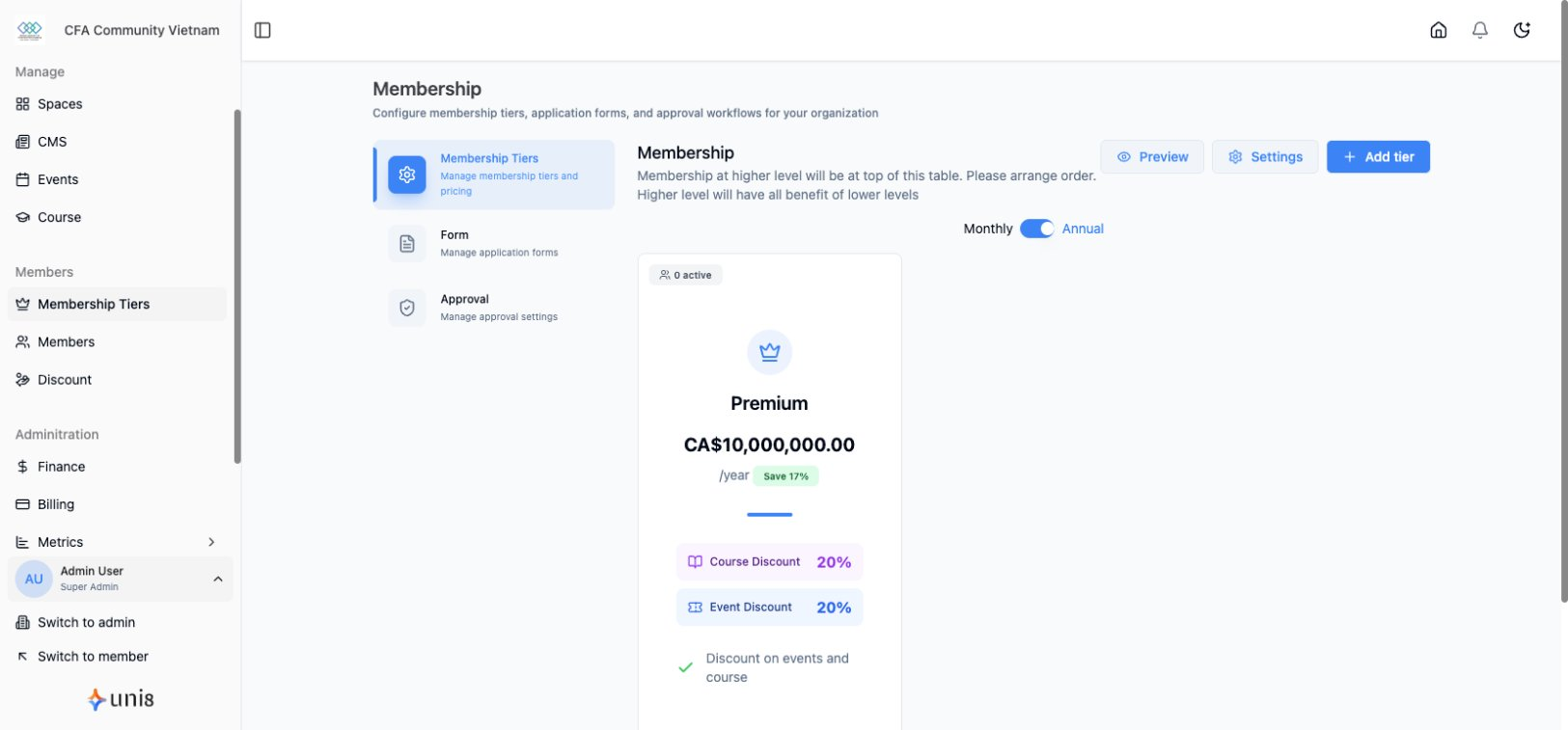
Set up pricing structures and define what benefits each membership tier provides.
Pricing Configuration
Setting Up Pricing
- Go to Membership > [Tier Name]
- Click Edit
- Configure:
- Base price
- Billing cycle
- Currency
- Save
Billing Cycles Explained
| Cycle | How It Works |
|---|---|
| Monthly | Charged every month on signup date |
| Yearly | Charged once per year |
| One-time | Single payment, lifetime access |
Monthly vs Yearly
| Factor | Monthly | Yearly |
|---|---|---|
| Commitment | Lower | Higher |
| Price per month | Higher | Lower (discounted) |
| Cash flow | Regular | Larger upfront |
| Churn | Higher | Lower |
Offering Annual Discounts
Encourage yearly subscriptions:
- Edit tier
- Enable yearly pricing
- Set annual discount (typically 15-20%)
- Members see monthly equivalent
Example: $10/month or $96/year (20% off)
Currency & Localization
Setting Currency
- Go to Settings > Payments
- Select primary currency
- All tiers use this currency
Multiple Currencies
Currently, one currency per community. For different currencies:
- Create separate community
- Use payment gateway's conversion
Member Benefits
What are Benefits?
Benefits are the value members receive:
- Content access
- Event perks
- Course enrollment
- Community features
- Discounts
Configuring Content Access
Control what each tier can access:
- Edit membership tier
- Go to Access section
- Select spaces/content tiers can access:
- Specific spaces
- Specific content types
- All content
Benefit Categories
| Category | Examples |
|---|---|
| Content | Premium articles, courses, videos |
| Community | Private spaces, direct messaging |
| Events | Free tickets, early access |
| Discounts | Member pricing on purchases |
| Perks | Downloads, resources, tools |
Setting Up Benefits
Adding Benefit Descriptions
- Edit tier
- Go to Benefits section
- Add benefit items:
- Clear description
- Icon (optional)
- Order
- Save
Benefit Display
Benefits appear on:
- Pricing page
- Tier comparison
- Member dashboard
- Upgrade prompts
Writing Good Benefits
Do:
- Be specific: "Access to 50+ courses"
- Highlight unique value
- Use action words
Don't:
- Be vague: "Premium content"
- Oversell
- List features as benefits
Content Access Rules
How Access Works
When a member subscribes to a tier:
- System checks tier permissions
- Content with matching tier requirement is accessible
- Content requiring higher tier shows upgrade prompt
Restricting Content
For each space or content piece:
- Go to content settings
- Set Access Level:
- Public (everyone)
- Registered (any member)
- Specific tier(s)
- Save
Access Hierarchy
Public → Anyone
  ↓
Registered → Logged-in members
  ↓
Free Tier → Free tier members
  ↓
Basic Tier → Basic + higher tiers
  ↓
Premium Tier → Premium members only
Event Benefits
Free Event Access
Give tier members free event access:
- Create event
- In ticket settings
- Add "Member Ticket" type
- Set price to $0
- Restrict to specific tier(s)
Early Access
Let premium members register first:
- Create event
- Set "Early Access" period
- Restrict early access to tiers
- Open to public later
Course Benefits
Course Access by Tier
Include courses in membership:
- Go to course settings
- Under Access
- Select "Membership Required"
- Choose which tiers include this course
Course + Membership Bundles
Option 1: Course included in tier Option 2: Discounted course price for members
Discount Benefits
Member Pricing
Offer special prices to members:
- Go to Discounts
- Create member-only discount
- Restrict to tier(s)
- Apply automatically or via code
Automatic Discounts
When members check out:
- System detects their tier
- Applies eligible discounts
- Shows member price
Displaying Benefits
Pricing Page
Customize how benefits appear:
- Go to Pages > Pricing
- Edit in Page Builder
- Configure:
- Tier cards
- Feature comparison
- Testimonials
- Publish
Comparison Table
Show clear tier differences:
| Feature | Free | Basic | Premium |
|---|---|---|---|
| News Access | ✓ | ✓ | ✓ |
| Premium Articles | - | ✓ | ✓ |
| Courses | - | 5 | Unlimited |
| Events | Pay | Discounted | Free |
Upgrade/Downgrade
Upgrading Tiers
When members upgrade:
- Prorated billing (pay difference)
- Immediate access to new benefits
- New billing cycle starts
Downgrading Tiers
When members downgrade:
- Takes effect at period end
- Keep current access until then
- Lose higher-tier benefits after
Best Practices
Pricing Strategy
| Strategy | When to Use |
|---|---|
| Value-based | Unique content, established audience |
| Competitive | Similar communities exist |
| Freemium | Build audience, convert later |
Benefit Clarity
- List specific items, not vague promises
- Show the value in numbers when possible
- Update benefits as you add content
Testing Prices
- Start with market research
- A/B test if possible
- Survey members about value
- Adjust based on conversion data
Related Guides
Need help? Contact support@uni8.ai