Managing Members
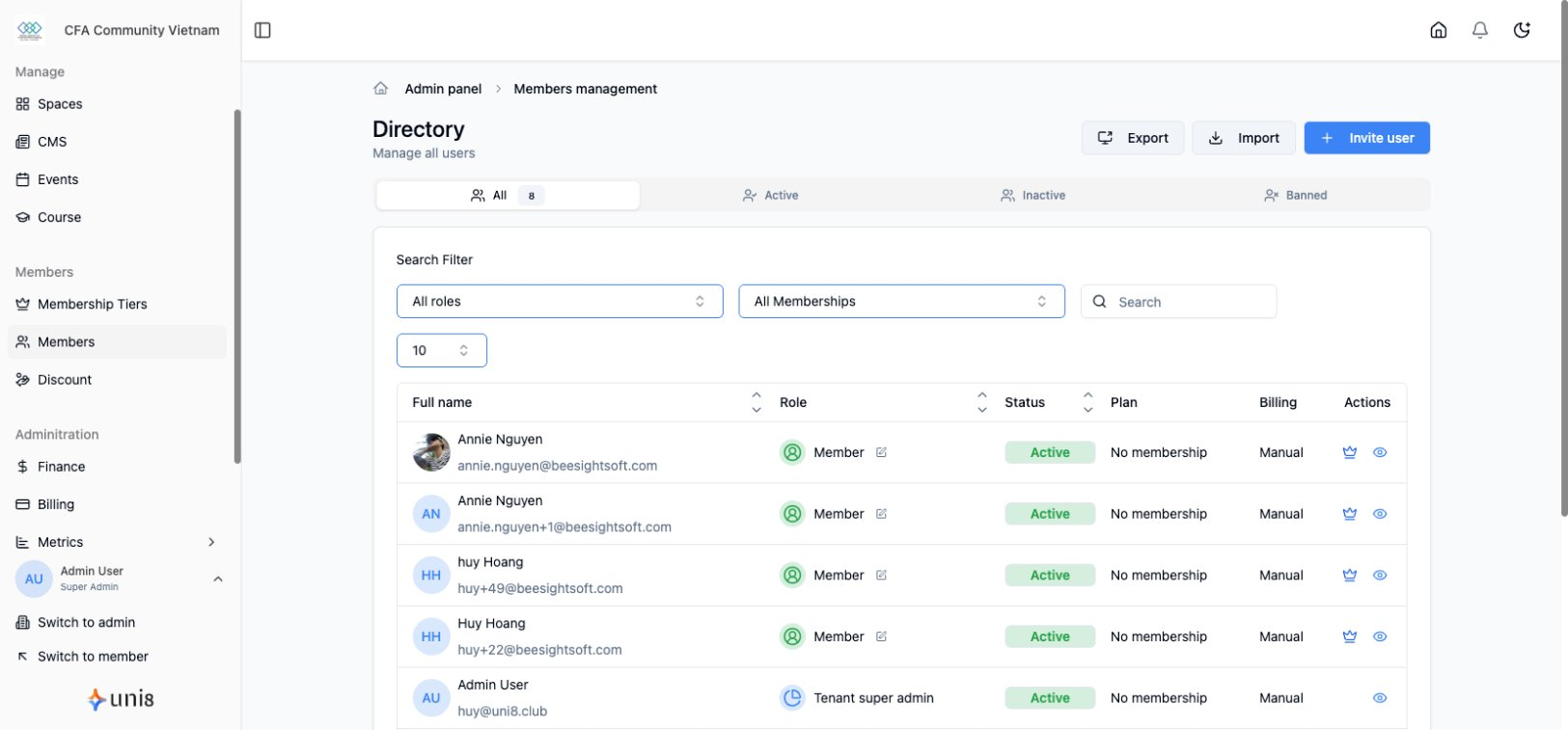
Manage your membership subscriptions, handle approvals, and support members through their lifecycle.
Member Overview
Viewing Members
- Go to Members in the sidebar
- See list of all members
- Filter by:
- Membership tier
- Status (active, expired, canceled)
- Join date
- Search by name/email
Member Profile
Click any member to view:
- Contact information
- Membership status
- Payment history
- Activity log
- Notes
Membership Statuses
Status Types
| Status | Meaning |
|---|---|
| Active | Paid and current |
| Trialing | In free trial period |
| Past Due | Payment failed, grace period |
| Canceled | Canceled, may have access until period end |
| Expired | Access removed |
Status Lifecycle
New → Trialing → Active → Renewal
                    ↓
              Past Due → Expired
                    ↓
               Canceled
Approval Workflows
Auto-Approve
Default behavior:
- Member signs up
- Payment processed
- Access granted immediately
Best for: Open communities, standard memberships
Manual Approval
Require admin review:
- Go to Membership > [Tier] > Settings
- Enable Require Approval
- Choose workflow:
- Review then pay - Approve before payment
- Pay then review - Payment first, then approve
Approval Process
When approval is required:
- Member submits application
- Application appears in Members > Pending
- Admin reviews
- Approve or Reject
- Member notified
Application Questions
Add screening questions:
- Go to tier settings
- Click Application Form
- Add custom questions
- Required or optional
- Save
Managing Individual Members
Upgrading a Member
Move to higher tier:
- Go to member profile
- Click Membership
- Click Change Tier
- Select new tier
- Choose billing:
- Prorate (charge difference)
- Start fresh (new cycle)
- Confirm
Downgrading a Member
Move to lower tier:
- Go to member profile
- Click Membership
- Click Change Tier
- Select lower tier
- Choose timing:
- Immediate
- End of current period
- Confirm
Canceling Membership
To cancel a member's subscription:
- Go to member profile
- Click Membership
- Click Cancel Membership
- Choose:
- At period end (keep access until expiry)
- Immediately (remove access now)
- Optionally add reason
- Confirm
Extending Membership
Gift extra time:
- Go to member profile
- Click Membership
- Click Extend
- Set duration
- Optionally add note
- Confirm
Handling Failed Payments
Grace Period
When payment fails:
- System retries payment
- Member enters grace period
- Access continues during grace
- After grace, access revoked
Configuring Grace Period
- Go to Settings > Payments
- Set grace period days (default: 7)
- Configure retry attempts
Recovering Failed Payments
- View members with Past Due status
- Contact member about payment issue
- They can:
- Update payment method
- Pay manually
- Or admin can:
- Extend grace period
- Cancel membership
Bulk Actions
Available Actions
| Action | Description |
|---|---|
| Export | Download member list as CSV |
| Send message to selected | |
| Change Tier | Move multiple members |
| Tag | Add/remove tags |
Performing Bulk Actions
- Go to Members
- Select members (checkboxes)
- Click Bulk Actions
- Choose action
- Confirm
Member Communication
Sending Messages
- Go to member profile
- Click Send Message
- Compose message
- Send via email or in-app
Automated Emails
System sends automatic emails for:
- Welcome (new member)
- Payment receipt
- Payment failed
- Subscription ending
- Subscription canceled
Customize templates in Settings > Notifications
Member Tags
Using Tags
Tags help organize members:
- VIP members
- Course completers
- Event attendees
- Special segments
Adding Tags
- Go to member profile
- Click Tags
- Add existing or create new
- Save
Filtering by Tags
- Go to Members
- Click Filter
- Select tag(s)
- View filtered list
Member Notes
Adding Notes
Keep internal notes about members:
- Go to member profile
- Click Notes
- Add note with date
- Notes visible only to admins
Use Cases
- Special arrangements
- Support history
- Approval decisions
- Feedback received
Reporting
Membership Metrics
Track in Analytics:
- Total active members
- New members this period
- Churn rate
- Revenue per tier
- Trial conversions
Export Data
- Go to Members
- Apply any filters
- Click Export
- Download CSV
Best Practices
Onboarding
- Send welcome email
- Guide to key content
- Introduce community
- Encourage first actions
Retention
- Deliver consistent value
- Engage regularly
- Respond to feedback
- Recognize loyal members
Handling Cancellations
- Exit survey to learn why
- Offer alternatives (pause, downgrade)
- Leave door open to return
- Process gracefully
Related Guides
- Membership Tiers
- Pricing & Benefits
- Transactions & Refunds
Need help? Contact support@uni8.ai